03 - Networking Fundamentals
📋 Jump to Takeaways🎁 A single lost packet can freeze an entire web page in HTTP/2, but HTTP/3 handles the same loss without blinking. What changed at the protocol level to make that possible?
Understanding networking protocols is essential for system design. Every decision, from choosing TCP vs UDP to picking an HTTP version, affects latency, reliability, and scalability.
TCP vs UDP
TCP (Transmission Control Protocol): reliable, ordered, connection-oriented.
- Uses a 3-way handshake before data flows. The OS kernel handles this — applications like browsers just call
connect()and the kernel takes it from there:- SYN (client → server): "I want to connect"
- SYN-ACK (server → client): "OK, I'm ready, and I got your message"
- ACK (client → server): "Got it, connection open" After that, data packets flow back and forth with just ACKs to confirm receipt. The connection stays open until one side sends a FIN to close it.
- Guarantees delivery through acknowledgments and retransmissions
- Flow control: receiver tells sender how much data it can handle (sliding window)
- Congestion control: sender slows down when the network is saturated (slow start, AIMD¹)
- Adds overhead: connection setup latency, header size, retransmission delays
¹ AIMD (Additive Increase, Multiplicative Decrease): slowly increase sending rate while things are fine, cut in half when packet loss is detected. This prevents network collapse while probing for available bandwidth.
UDP (User Datagram Protocol): connectionless, no delivery guarantees.
- No handshake, just send packets immediately (saves 1 round trip vs TCP)
- "Unreliable" means no guarantee at the protocol level, not "broken." It's a deliberate tradeoff for speed
- No ordering, no congestion control, no retransmissions. A lost packet doesn't block subsequent ones
- Minimal overhead: 8-byte header vs TCP's 20+ bytes
- The application handles retries if needed (e.g., DNS retries after a timeout, video streaming skips the lost frame)
- UDP has no concept of a "connection." The sender has no idea if the client is still there. Applications solve this with heartbeats or timeouts.
When to Choose Which
| Criteria | TCP | UDP |
|---|---|---|
| Reliability required | ✅ Guaranteed delivery | ❌ Best-effort |
| Latency-sensitive | ❌ Handshake + retransmits add delay | ✅ Fire and forget |
| Ordering matters | ✅ In-order delivery | ❌ Out-of-order possible |
| Use cases | APIs, web pages, file transfers, databases, email | Video streaming, gaming, DNS lookups, VoIP, metrics |
| System design signal | "We can't lose data" | "Speed > reliability, or app handles loss" |
Design rule: default to TCP unless you have a specific reason to use UDP (real-time streaming, high-frequency telemetry, or you're building your own reliability layer on top).
Example: Video Streaming, On-Demand vs Live
| On-Demand (Netflix) | Live (Twitch, Zoom) | |
|---|---|---|
| Protocol | TCP (HTTP/HTTPS), increasingly QUIC | UDP (or UDP-based like WebRTC, QUIC) |
| Why | Buffering hides latency. A 30-60 second buffer means retransmissions are invisible to the user. Reliability matters — you don't want glitches in a movie. | Real-time matters. A lost frame from 1 second ago is useless — just show the next one. Retransmitting would add delay and make the stream feel laggy. |
| Tradeoff | Higher latency (buffering), perfect quality | Lower latency, occasional visual artifacts |
On-demand can afford TCP's overhead because it buffers ahead. Live streaming can't wait for retransmissions. Stale data is worse than missing data.
How streaming works without ordering: UDP itself has no ordering, but protocols like RTP (Real-time Transport Protocol) sit on top and add sequence numbers and timestamps to each packet. The receiver holds packets in a small jitter buffer (20-200ms), reorders them by timestamp, and plays them in sequence. If a packet hasn't arrived by its playback deadline, it's skipped. The decoder repeats the last frame or interpolates. This gives "good enough" ordering without TCP's head-of-line blocking penalty.
Browsers and UDP: JavaScript cannot open raw UDP (or TCP) sockets. This is a security restriction — raw sockets would enable port scanning, DNS spoofing, and DDoS amplification from any web page. Browsers limit you to HTTP (fetch), WebSocket (TCP-based), and WebRTC (UDP-based, but managed by the browser). When HTTP/3 sends your fetch() over UDP via QUIC, that's the browser's networking stack choosing the transport, not your code. Native applications (game clients, Zoom desktop) don't have this restriction and can use raw UDP directly.
DNS
DNS translates human-readable domain names into IP addresses.
How Resolution Works
When you type api.stripe.com in a browser, your machine doesn't know its IP. Here's how it finds it:
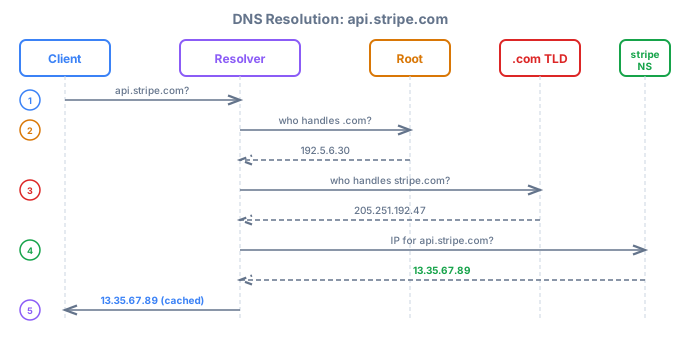
- Recursive resolver (your ISP or 8.8.8.8²) does the work on your behalf
- Root nameserver knows where to find
.com,.io,.orgTLD servers (13 root clusters worldwide) - **TLD nameserver**³ knows which authoritative server handles
stripe.com - is Stripe's own DNS server (hosted on Route 53, Cloudflare, etc.). "Authoritative" means "source of truth for this domain," not authentication. It stores the record
api.stripe.com → 13.35.67.89because Stripe configured it there. - Result is cached at every level (browser, OS, resolver) for the duration of the TTL
² 8.8.8.8 is Google's public DNS resolver. Other popular options: 1.1.1.1 (Cloudflare) and 9.9.9.9 (Quad9).
³ TLD = Top-Level Domain (.com, .org, .io, etc.). The TLD nameserver knows which authoritative server handles each domain under that TLD, but doesn't know the final IP itself.
DNS Record Types
| Type | Purpose | Example |
|---|---|---|
| A | Maps domain → IPv4 address | api.example.com → 93.184.216.34 |
| AAAA | Maps domain → IPv6 address | api.example.com → 2606:2800:... |
| CNAME | Alias to another domain | www.example.com → example.com |
| MX | Mail server for the domain | example.com → mail.example.com |
| NS | Authoritative nameservers | example.com → ns1.provider.com |
TTL and Caching
- TTL (Time to Live): how long a DNS record is cached before re-querying
- Caching happens at: browser, OS, recursive resolver, and intermediate servers
- High TTL (hours/days): fewer lookups, but slow to update during incidents
- Low TTL (30-60s): fast failover, but more DNS traffic
DNS in System Design
DNS-based load balancing:
- Round-robin DNS: return multiple IPs, clients pick one. Basic round-robin has no health checks. The DNS server doesn't know if a backend is down (though providers like Route 53 and Cloudflare add health-checked variants).
- GeoDNS: return different IPs based on client location. Routes users to nearest region.
- Weighted DNS: distribute traffic unevenly (e.g., 90/10 for canary deploys).
DNS-based load balancing is coarse-grained. It works per-connection, not per-request. It can't do session affinity or fine-grained traffic splitting. Use it for global routing; use a real load balancer (L4/L7) for request-level distribution.
DNS as a failure point:
- If your nameserver goes down, nobody can resolve your domain
- Propagation delay: changing a DNS record doesn't take effect instantly. Cached entries persist until TTL expires, and some resolvers ignore TTL
- Mitigation: multiple redundant nameservers across providers, low TTL for quick failover
- Services like Route 53, Cloudflare DNS provide built-in redundancy and health checks
HTTP Versions
HTTP/1.1
- Persistent connections: reuse TCP connections across requests (keep-alive)
- Head-of-line (HOL) blocking: one slow response blocks all subsequent requests on that connection (e.g., a large image blocks a small JSON call behind it)
- Browsers open 6 parallel connections per domain to work around HOL blocking
- Workarounds: domain sharding (serve from multiple subdomains to bypass 6-connection limit), sprite sheets (combine images into one file), bundling (combine JS/CSS into one file). All hacks to reduce request count. Obsolete with HTTP/2.
HTTP/2
- Multiplexing: multiple requests and responses interleaved on a single TCP connection, eliminating the need for multiple connections and making HTTP/1.1 workarounds unnecessary
- Header compression (HPACK): reduces redundant header bytes across requests
- Server push: server sends resources before client requests them. Rarely used because it's hard to avoid pushing resources the client already cached, and Chrome dropped support in 2022.
- Stream prioritization: client hints which resources matter most
- Still suffers from TCP-level HOL blocking because TCP treats all streams as one byte stream, so one lost packet stalls all streams even if they're independent
Two kinds of HOL blocking:
- HTTP-level (HTTP/1.1): requests queue up; request B waits for response A to finish. Fixed by HTTP/2 multiplexing.
- TCP-level (HTTP/2): TCP guarantees in-order byte delivery, so a lost packet holds up all streams until retransmitted. Fixed by HTTP/3/QUIC, where each stream is delivered independently.
HTTP/3
- Built on **QUIC**⁴, a UDP-based transport that reimplements TCP's reliability (ordering, retransmission) but per-stream instead of per-connection
- Eliminates TCP HOL blocking. Packet loss in one stream doesn't affect others, because each stream is independent at the transport level
- 0-RTT connection setup: resume previous connections instantly (vs 2 RTT (Round-Trip Time) for TCP+TLS 1.3, or 3 RTT with TLS 1.2). First connection still needs 1 RTT. Think of it like: normally you knock, wait for an answer, show ID, wait for approval, then talk. With 0-RTT, you walk in and start talking because the server remembers you from last time.
- Built-in encryption (TLS 1.3 integrated into the protocol, no separate TLS handshake)
- Connection migration: switch networks (e.g., WiFi → cellular) without dropping the connection, because QUIC identifies connections by ID, not by IP+port
- Better performance on unreliable networks (mobile, high-latency)
⁴ QUIC originally stood for "Quick UDP Internet Connections" (Google), but is now just a name (IETF RFC 9000).
HTTP Version Comparison
| HTTP/1.1 | HTTP/2 | HTTP/3 | |
|---|---|---|---|
| Transport | TCP | TCP | QUIC (UDP) |
| TCP connections | 6 per domain | 1 | 0 (no TCP) |
| Multiplexing | No | Yes | Yes |
| HOL blocking | HTTP-level + TCP-level | TCP-level only | None |
| Header compression | No | Yes (HPACK) | Yes (QPACK) |
| Encryption | Optional (TLS separate) | Optional (TLS separate) | Built-in (TLS 1.3) |
| Connection setup | 1-3 RTT | 1-3 RTT | 1 RTT (0-RTT on resume) |
| Connection migration | No | No | Yes |
What's Used Today
HTTP/2 is the default. Most web servers, CDNs, and browsers use HTTP/2 today. If you deploy behind Cloudflare, AWS ALB, or Nginx, you're already on HTTP/2 without doing anything special.
HTTP/3 is growing fast. Google, Cloudflare, and Meta serve most traffic over HTTP/3. Browsers auto-upgrade when the server supports it. By 2025, ~30% of web traffic uses HTTP/3.
HTTP/1.1 is still everywhere for backend-to-backend calls, legacy APIs, and simple tools (curl, webhooks). It works fine when latency is already low.
For system design interviews: assume HTTP/2 for client-facing traffic and mention HTTP/3 as an optimization for mobile/global users.
When Each Matters in System Design
| Scenario | Best Choice | Why |
|---|---|---|
| Internal microservices (same datacenter) | HTTP/2 or gRPC | Low latency already, multiplexing helps |
| Public-facing web app | HTTP/2 minimum, HTTP/3 ideal | Reduces page load time for users |
| Mobile clients on spotty networks | HTTP/3 | Connection migration, 0-RTT, no HOL blocking |
| Legacy system integration | HTTP/1.1 | Compatibility, simplicity |
| Real-time bidirectional | WebSockets | Full-duplex communication |
Key Takeaways
- Default to TCP for most system design scenarios; choose UDP only when latency trumps reliability (streaming, gaming, telemetry)
- DNS is infrastructure. Use GeoDNS for global routing, low TTLs for failover, and redundant nameservers to avoid SPOF
- HTTP/2 is the baseline for modern services. Multiplexing eliminates most HTTP/1.1 workarounds
- HTTP/3 (QUIC) shines on unreliable networks. Mention it when designing for mobile or global users
- DNS-based load balancing is the simplest global traffic distribution but lacks health-awareness without a managed DNS service
- Know the tradeoffs at each layer. Interviewers want to hear you reason about latency, reliability, and failure modes
🎁 Your single server handles 100 users just fine. Then a blog post goes viral and 10,000 users hit it at once. Do you buy a bigger machine or add more machines, and how do you decide?